Sales Backlog Report: Backlog vs Open Orders (Budget Included)
Sales teams don’t lose credibility because they “sell wrong.” They lose credibility because they report wrong — and the fastest way to create chaos is a messy sales backlog report.
I’ve seen a real dispute between sales and planning start with a sentence that sounded like a win: “We’ve already hit the yearly target by mid-year.” Sales had booked large frame contracts, blanket orders, and supply agreements. On paper, it looked like the year was done.
Planning didn’t celebrate. Because for production, those documents weren’t enough to plan capacity. They weren’t a reliable sales backlog report yet. A frame contract can look like “secured” to sales, but it’s not backlog for production until it turns into scheduled releases.
Sales looked at what was already invoiced plus what was still open in the system and concluded the budget would be reached by year-end. Planning looked at what could actually be scheduled and shipped and saw a gap. Same company. Same “orders.” Two different realities.
Most teams don’t miss targets because they lack deals. They miss because they mix budget, sales backlog, and open orders into one fuzzy number. Open orders = all undelivered order lines; sales backlog = the confirmed, deliverable slice you can actually plan production around (frame/blanket agreements become backlog only once releases exist). Trigger → Action: if open orders are high but planning still can’t schedule, split the report into released backlog vs blocked/future lines and assign an owner to every blocked line.
Definition Box:
- Budget = the goal (Revenue $, Units, Margin)
- Open orders = everything not dispatched/shipped yet
- Backlog = the deliverable slice you can plan and build around
By the end of this post, you’ll have one weekly rhythm that stops “we’re on target” surprises before they blow up month-end.
Quick naming reality: many ERPs don’t call it “sales backlog report.” You’ll often see “open orders report” or “order backlog report.”
At a Glance
- What this guide does: Separates budget vs sales backlog vs open orders so reporting becomes actionable (not political).
- Who it’s for: B2B reps and sales managers working with planning/ops (especially in manufacturing and order-to-cash businesses).
- What you’ll walk away with: A simple weekly report rhythm + Trigger → Action rules that stop “we’re on target” surprises.
- Core rule: Open orders are undelivered order lines. Sales backlog is the deliverable, confirmed slice you can plan capacity around.
- If you only do one thing: Split “open orders” into released backlog vs blocked/future lines and assign an owner + next date to every blocked line.
- What you’ll build: a simple sales backlog report + open orders rhythm with triggers → actions.
Sales Backlog Report Definitions: Budget vs Open Orders
Let’s lock the language first, because every reporting fight starts with people using the same word for different things. If you want a quick reference page, bookmark: sales reporting definitions.
Budget / Target (the finish line, often multiple finish lines)
What it is: The target you’re aiming to hit in a period (month/quarter/year). Depending on the company, budget can be one or more of:
- Revenue ($)
- Units / volume
- Gross margin ($ and/or %)
- Net margin / contribution margin ($ and/or %)
What it is not: A production plan or a list of orders. Budget is the goal. Backlog/open orders are the workload and delivery reality.
Trigger → Action:
Trigger: Revenue is green but units or margin is red.
Action: Add a cut of backlog shipping this period by ship month + margin band/product group so you see what kind of sales you’re actually going to deliver.
Open Orders (status: not finished yet)
Plain English: All sales order lines that are not dispatched/shipped yet. In many companies that invoice on dispatch, these lines are typically not invoiced yet.
Open orders often include a mix of: deliverable lines, blocked lines (credit hold, missing info), future-dated demand, and partially shipped orders (remaining lines still open).
Trigger → Action:
Trigger: Open orders are high, but nothing moves week to week.
Action: Split open orders into deliverable / blocked / future-dated and assign an owner + next update date to every blocked line.
Sales Backlog (the plan-able slice of open orders)
Plain English: The part of demand you can realistically plan production and delivery around. A simple working definition used in many businesses: backlog is uncompleted work still waiting to be done (not yet shipped). Reference: Investopedia’s backlog definition.
Trigger → Action:
Trigger: Backlog looks strong, but planning still can’t schedule.
Action: Your “backlog” definition is too loose. Separate released backlog from everything else.
Frame contracts / blanket orders / supply agreements (coverage, not backlog)
These can be big commercial wins, but they’re not automatically production reality. Many teams treat them as coverage until they create releases/call-offs with quantities and dates. If you are negotiating the terms of that agreement in the first place, rather than reporting on one already in place, see structuring a frame contract before you sign.
Trigger → Action:
Trigger: Sales counts agreement value toward year-end delivery; planning rejects it.
Action: Report two lines: Contract coverage ($) and Released backlog ($). Only released backlog should drive production planning.
Budget vs actual tells you what happened. This gap-to-budget routine shows the shortfall early and turns it into a monthly action plan.
What a “Sales Backlog Report” Should Actually Show (and what it must NOT show)
A backlog report is only useful if it answers one question: What is realistically going to ship, and what’s stopping it?
The minimum fields (non-negotiable)
If these are missing, you don’t have a backlog report. You have a number people can argue about.
- Customer
- Order/PO + line item
- Value ($) and (if relevant) quantity/units
- Requested ship date (customer) + confirmed/promised ship date (ops)
- If you can’t confirm: estimated ship date
- Status (released, pending, blocked, partially shipped)
- Last movement date
- Block reason (credit hold, missing drawing, capacity, material, dispute)
- Owner (a person, not “Sales”)
Trigger → Action:
Trigger: Your report has no dates or no last movement date.
Action: Make ship date + last update mandatory, or the weekly review becomes theater.
The 3 splits that make it actionable
To stop backlog from being a vanity number, split it:
- By ship month/week (delivery reality)
- By aging (stuck orders)
- By risk flag (block reason + severity)
Trigger → Action:
Trigger: Total backlog is green, but deliveries keep slipping.
Action: Review the “ships this period + at-risk” bucket first, not the total.
Related internal read: metrics that belong in reports.
Estimated dates are allowed, but make confidence visible
If you include estimated dates, don’t pretend they’re promises. Add one simple tag: Confirmed date: Yes/No (or High/Medium/Low confidence).
Trigger → Action:
Trigger: Too many lines are “estimated date” with low confidence.
Action: Split backlog into confirmed-date backlog vs estimated-date backlog and work the estimated bucket first.
What it must NOT show
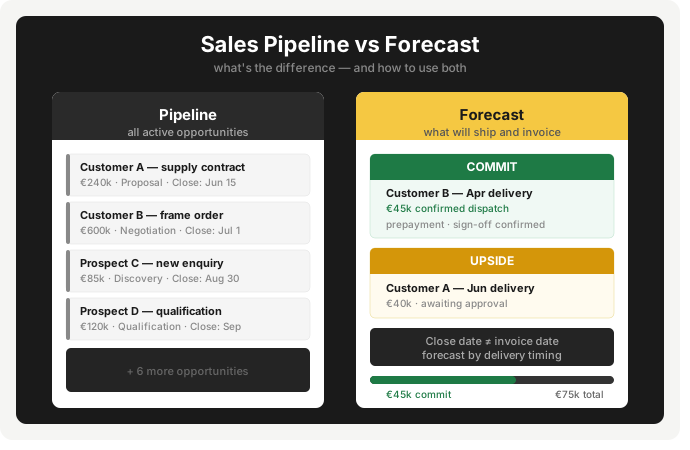
- Don’t mix pipeline stages into backlog.
- Don’t hide blocked orders inside one total number.
- Don’t report only revenue if your budget includes units and margin.
Internal reference: pipeline ≠ backlog.
How to Use These Reports Weekly: Triggers → Actions (so deals don’t rot)
The goal of weekly reporting isn’t to “know the number.” It’s to force movement on the lines that decide whether you ship and invoice this month.
The weekly 15-minute agenda
- Budget scoreboard: Revenue ($), Units, Margin
- Released backlog shipping this period: confirmed + estimated dates (clearly marked)
- Open orders triage: blocked + aging + repeat slips
Trigger → Action:
Trigger: Your weekly meeting turns into debating definitions.
Action: Start by reading the one-sentence definitions, then move straight to actions.
Backlog review buckets (steal this order)
- Bucket A: Confirmed date, ships this period (protect it)
- Bucket B: Estimated date, ships this period (convert estimates)
- Bucket C: Ships later (don’t let it pollute this month)
- Bucket D: Blocked (unblock or downgrade)
Trigger → Action:
Trigger: You “have backlog” but shipments are still at risk.
Action: Bucket B is too big. Convert estimates into confirmed dates or escalate constraints.
Open orders triage: aging + repeat slips
Two simple flags catch most problems:
- Aging: no movement for X days (X varies by industry/company and lead time)
- Repeat slip: ship date moved more than once
Trigger → Action:
Trigger: Lines sit with no movement for X days.
Action: Force a decision: confirm, unblock, reschedule, or reclassify as blocked/future so it stops polluting deliverable backlog.
Ownership rules (prevents the blame game)
- Sales owns: customer confirmations, pushing releases/call-offs, renegotiating dates, getting missing info
- Ops/Planning owns: realistic dates, capacity truth, what is schedulable
- Finance owns: credit holds, disputes, payment blocks
- Shared rule: every red item leaves the meeting with an owner + next update date
Common Reporting Mistakes That Break Planning (and the simple fixes)
These mistakes are common because they’re convenient. They let everyone feel “up to date” without forcing uncomfortable clarity.
Mistake #1: Treating pipeline like backlog
Fix: Keep three separate buckets: pipeline (maybe), forecast (probable), backlog/open orders (committed).
Trigger → Action:
Trigger: “Backlog” changes because a deal moved stages in CRM.
Action: You’re mixing buckets. Remove CRM stages from the backlog report.
Mistake #2: One total number for backlog
Fix: Always split into ships this period vs later vs blocked, and confirmed-date vs estimated-date.
Trigger → Action:
Trigger: Backlog is high but shipments keep missing.
Action: Report deliverable backlog separately and review it first.
Mistake #3: Counting frame/blanket agreements as ship-ready backlog
Fix: Track agreement coverage separately from released backlog.
Trigger → Action:
Trigger: “We already hit the year” appears mid-year based on agreements.
Action: Ask for released backlog by ship month. If it’s not released, it’s not production reality.
Mistake #4: No “last movement date” = zombie orders
Fix: Add last movement date + next action date.
Trigger → Action:
Trigger: No update for X days (X varies by company/industry).
Action: Assign owner + next date, or reclassify the line as blocked/future.
Mistake #5: Reporting revenue without units/margin (when budget includes them)
Fix: Use a 3-line scoreboard aligned to your budget: revenue ($), units, margin.
Trigger → Action:
Trigger: Revenue is green but margin is red.
Action: Review backlog shipping this period by margin band/product group, then adjust priorities or pricing.
Budget vs Backlog vs Open Orders: What to Track + Triggers → Actions
Source (typical): Budget = Finance/BI, Backlog/Open Orders = ERP, Coverage = contracts/CRM.
Cadence: weekly (execution) + month-end (gap analysis).
Owners: Sales owns customer action, Ops owns dates, Finance owns holds.
Note: “X days” thresholds vary by industry/company and product lead time. Define yours once, then stick to it.
| Report line | What it tells you | Trigger (red flag) | Action (what to do next) |
|---|---|---|---|
| Budget scoreboard (Revenue $ / Units / Margin) | Are we pacing to target and delivering the right mix | Revenue green but Units or Margin red | Split backlog shipping this period by ship month + margin band/product group and adjust priorities |
| Agreement coverage ($) | Commercial commitment (frame/blanket/supply agreements) | Coverage high but planning can’t schedule | Report coverage vs released backlog separately; push releases/call-offs with dates/qty |
| Open orders ($ / units) | Everything not dispatched/shipped yet | Open orders high but nothing moves | Split deliverable / blocked / future-dated; assign owner + next update date to every blocked line |
| Sales backlog ($ / units) | The demand slice you plan around | Backlog green but planning still says “no plan” | Tighten definition: separate released vs not released + add date confidence |
| Released backlog (confirmed or estimated date) | What can realistically ship | Too many estimated dates / low confidence | Split confirmed vs estimated; convert estimates or escalate constraints |
| Aging (no movement for X days) | Zombie lines that rot quietly | No update for X days | Force decision: confirm, unblock, reschedule, or reclassify |
| Repeat slip (date moved > 1x) | Chronic execution risk | Same line slips repeatedly | “Third strike rule”: expedite, renegotiate, swap, or de-scope/cancel |
Concrete system example: Oracle’s “Backlog Summary Report” documentation.
ERP framing example: SAP help “Backlog Overview”.
A Simple Reporting Rhythm: Who reviews what, when, and what happens next
Most reporting fails because it produces numbers, not decisions. The fix is a rhythm where every report line creates a next step.
Weekly (15 minutes): Sales + Planning/Ops
Goal: protect what will ship and unblock what won’t.
Agenda:
- Budget scoreboard
- Released backlog shipping this period
- Open orders triage (blocked, aging, repeat slips)
Trigger → Action:
Trigger: The meeting runs long and nothing changes after.
Action: Cap it at 15 minutes and enforce: every red item leaves with an owner + next update date.
Month-end (30–45 minutes): Sales + Finance + Ops
Goal: explain gap-to-budget and stop the same miss repeating next month.
Review:
- Gap to budget ($ / units / margin)
- Backlog conversion (shipped vs slipped)
- Top slip reasons (capacity, material, customer delays, credit holds, etc.)
Trigger → Action:
Trigger: Same reasons show up every month.
Action: Turn the top 1–2 reasons into a process change (date confirmation SLA, earlier credit checks, release rules).
Ownership rules (keep it fair, keep it strict)
- Sales owns customer actions and release conversion
- Ops owns realistic dates and schedulability
- Finance owns holds and disputes
- Every line has a person and a next date
Conclusion
Budget is a goal. Open orders are a status. Backlog is a planning tool. When those three get mixed, you don’t just get messy reports. You get the exact conflict that kills trust between sales and planning.
The fix isn’t a new dashboard. It’s discipline: track agreement coverage separately from released backlog, split open orders into deliverable vs blocked vs future, and make dates explicit (confirmed vs estimated). Then run the weekly rhythm with one hard rule: every red item needs an owner + next update date.
FAQ
A sales backlog report shows the confirmed, unfulfilled demand you can realistically plan around. A simple definition of backlog is “uncompleted work still waiting to be done.” Reference: Investopedia.
No. Open orders are everything not dispatched/shipped yet. Backlog is the slice you treat as plan-able (often confirmed and deliverable).
Because open orders are your pre-shipment workload. They show what can still ship this period and what’s stuck before it becomes a missed month.
Not as recognized revenue. Backlog can indicate potential future sales, but it’s still unfulfilled work until it ships.
Customer, order/line, value ($) and units, requested date, confirmed/estimated ship date, status, last movement date, block reason, and an owner.
Use aging: “no movement for X days” (X varies by industry/company and lead time). Anything stale needs a forced next step.
Weekly for execution. Add a month-end review for gap-to-budget and recurring slip reasons.
Separate agreement coverage from released backlog. Coverage is commitment. Released backlog is schedulable reality.